Posts

3 New Hire Mistakes That HR Onboarding Software Can Fix

Starting work with a new employer is a big deal to a new employee. That goes without saying. Not so widely recognized is how big of a deal it is to the Human Resources and Admin teams within the new employer. These are the folks typically tasked with procuring all of the documentation and resources for new hires.

While most new hires are focused on making a great first impression with their bosses and peers, they don’t always seem to be as focused on doing the same with HR. At least that’s how it seems when looking at new hire paperwork. Below are three of the most common mistakes newly hired employees make with their onboarding documents, and how implementing HR onboarding software can address them:

HR Mistakes: Missing documents

This is, by far, the most common frustration for HR staff coordinating new hire activities. In many cases, new employees feel overwhelmed by paperwork. It’s easy for them to misplace a document. If they work off-site and have to fax or scan/email their paperwork, it’s common for pages to stick together, etc. Once this happens, the burden falls back to the human resources team to track down those missing documents in a timely fashion. For organizations hiring a handful of people a year, this is an annoyance, but can be managed. For those hiring at higher volume, it can be nearly impossible. Most onboarding software tools resolve this easily by allowing both the new hire and the HR team to see what documents have been completed vs. those still outstanding. Communication between HR and the new hire may also typically be automated within onboarding software, providing added efficiency.

HR Mistakes: Documents completed incorrectly

Here’s another common struggle for HR team members. Many statutory documents like the I-9, W-4, state withholding forms and WOTC forms are very confusing for new hires. For some, this could be their first job. For others, it may have been years since they completed forms like these. Regardless of the situation, it’s rare that new hires will get these documents completed correctly on their own. Some organizations have HR staff meet with each new hire to complete these documents, increasing the level of accuracy. Unfortunately, this is time-consuming and unproductive — that’s why most organizations don’t do this. Paperless HR onboarding software addresses this by greatly simplifying the data gathering process. Many leading web-based solutions will gather information from new hires in an interview-type fashion — much in the same way tax preparation software gathers information needed for your 1040 form. Then, these tools auto-populate both the statutory forms and an organization’s unique forms with the information collected from the “interview.” This dramatically reduces mistakes, as new hires no longer must understand documents and/or where certain pieces of information belong on given forms.

Unsigned new hire paperwork

Hard to believe, but true. Sometimes this happens due to a simple oversight from the employee. More often, it’s not clear to the individual where a signature is required for given documents. Using onboarding software again alleviates this issue. By utilizing electronic signatures and the auto-population of document fields, paperless onboarding tools make this type of mistake virtually impossible. New hires are able to see fully-completed documents and indicate their consent within the solution. The onboarding software then records their electronic signature and affixes it in the proper area of each document. Simple for the new employee, and less work for the human resources administrators.

An effective employee onboarding application should fix these mistakes, create a more positive experience for new hires, and improve efficiency for the HR team. To learn more about ExactHire’s OnboardCentric portal, please visit our employee onboarding software product page today.

Image credit: Stupid Garbage Compactor by JD Hancock (contact)

How to Automate the New Hire Process

Time is the hottest commodity on the market. There are many more things to be done today, but the hours in a day have stayed the same. Because of this, we begin looking for ways to automate various tasks in our day. If you’re in Human Resources, you might be asking how we can automate the new hire process.

The Employment Application

The best place to begin automating your hiring process is with the application. An online application that can help standardize your job description postings, add additional job specific questions to the application process, and automatically place applicants into an electronic database is a great place to start! You could decide to make a simple online form for the application process (which would not likely include the cool features mentioned above) or you could use an Applicant Tracking System (ATS) to create an online application (which would include the cool features mentioned above).

Scoring Applicants

By using an ATS, you could also include scoring filters on questions that you ask applicants. This would allow you to sort your applicant pool quickly, giving you those who most accurately fit the profile that you’re seeking at the top of your “stack.” For example, if you need a mid-level person with 2 – 4 years of experience you could include the following question with score levels that you customize:

How many years of customer service experience do you have?

  • Option 1: Zero – one year of experience (score = 0)
  • Option 2: > 1 year, but < 2 years of experience (score = 5)
  • Option 3: > 2 years, but < 4 years of experience (score = 10)
  • Option 4: > 4 years, but < 6 years of experience (score = 2)
  • Option 5: > 6 years of experience (score = 0)

From this question, along with a few others, you could sort your applicants based on the score attained and begin reviewing applicants that most closely fit your preferred candidate skill/experience profile.

Routing Application(s) for Review

With the HireCentric ATS, you can route applications to various people within your organization and the system will keep track of to whom you routed the application, as well as, when the other person reviewed that application. No more stapling a routing slip to a resume or a teammate saying they spilled coffee on the only copy. It can all be automated through applicant tracking software! A few simple clicks and away it goes.

Completing New Hire Paperwork

Already have the application, scoring, and routing process all set? Really looking for a way to automate the “hundreds” of forms a newly hired employee fills out? The new hire paperwork process can be automated by using employee onboarding software. We build your paperwork forms into an online database. The new hire fills out the questions – all electronically. That information populates the forms and the employee may electronically sign them. You or anyone else on your team with access can approve the forms and then print, forward, archive, etc. the forms. Our onboarding software can be connected to our HireCentric ATS which means as soon as you decide to hire an applicant, directly from their HireCentric file, you can invite the new teammate to begin completing paperwork.


Making the new hire process paperless does not have to be a complicated nor difficult process. Let us help you find more time in your day! Visit our resources section for more information or contact us to schedule a live demo.

Image credit: Zahnrad. / Gear. by Stefan W (contact)

Are Electronic Signatures Valid?

Because our employee onboarding software utilizes electronic signatures, we are quite frequently asked “are electronic signatures valid?” The short answer is…yes.

Requirements for Valid Electronic Signatures

However, for this to hold true, there are conditions that have to be met. These were established with the Electronic Signatures in Global and National Commerce Act (ESIGN) of 2000. While you may wish to consult your Labor & Employment attorney for more details, I’ve listed below the core requirements that must be met for an electronic signature to be valid:

  • The person signing the document must be allowed to view the completed document before being asked to provide his/her signature — this is to prevent any potential fraud in these types of transactions.
  • The signature must be unique and verifiable — whatever device or software tool is being used to capture this must be able to record how the signature was entered, when (time & date), and how it is tied to that individual (password, IP address, etc.).
  • The document may not be altered after the signature is affixed — as with the first point above, this is designed to make sure agreements can’t be changed after a person has signed them.
  • The signature must capture the consent and understanding of the person providing it — this may be accomplished a number of ways, but is designed to make sure any “fine print” is made clear and obvious to any parties involved in the electronic signature process.

These guidelines are based on the federal ESIGN Act (referenced above), and apply to interstate commerce. However, there are states that will occasionally designate certain documents as not eligible for electronic signature recognition. While this doesn’t happen frequently, you should certainly check with your organization’s attorney before moving ahead with any service/solution that utilizes this process.

That exception notwithstanding, most any new hire documents are certainly eligible for e-signature. This includes files like I-9’s, W4’s, direct deposit forms, company policies and procedures, employee handbook acknowledgments, etc.

Selecting an Onboarding Software Vendor

Because this is a newer type of offering for most HR software providers, when going through the process of selecting a partner, please be sure to confirm that the vendor’s electronic signature process will pass muster, if challenged. The benefits of onboarding software are compelling, but you want to be sure you partner with a provider who understands and can explain how their tool complies with these protocols.

If you’d like to learn more about ExactHire and how our paperless onboarding software can benefit your organization, please visit our resources section or contact us today.

What Did You Do Today? Avoid New Employee First Day Nothings

When you were a kid, did your parents ever ask you, “What did you do today?” Typically the answer, “nothing,” would roll off the tongue and away you went doing something else. Or, maybe you now ask your children this same question as you have gotten older.

What if someone asked one of your new hires what they did with your organization on the first day of work? Would the answer be “nothing?” Would that response be justified? If I spent my entire first day filling out forms, being told to read this or that, and setting up my desk I would most likely answer with “nothing” as well.

Use the Pre-Boarding Time Period

So how do you onboard your new employees in such a way that their answer will be far from “nothing?” My advice would be to take advantage of the pre-boarding time frame – that time span from when the new hire signs the offer letter to the point where he/she starts the first day. However, you do have to be cautious not to overwhelm the new hire with so much information that he/she doesn’t have time to get through it all, either.

An easy way to keep the balance is to have the new hire complete much of the new hire paperwork in advance of the first day. Our OnboardCentric employee onboarding software can help with that. The new hire logs into a portal that contains all of your company’s new hire paperwork. The individual completes the forms assigned based on position/department/division. This portal can also contain handbooks and other supplemental information that you want all new hires to review. Depending on how long a new hire normally spends filling out paperwork and reading information on his/her first day, you could free up that entire amount of time.

Warm Fuzzy Feelings for New Employees

If you provide a new hire with any type of uniform or apparel pieces, you could be reminded to gather sizing information via a task reminder in your onboarding software platform and have those garments available upon arrival. Giving the new hire the impression that you have been anxiously anticipating his/her arrival and inclusion as part of your company, can help create the “warm and fuzzy” feelings for the new hire. First impressions can help employees determine if they see themselves as a “lifer” or if your company is a stepping stone. The OnboardCentric portal also helps encourage the assertive hires that your company does truly move at a fast pace, accepts technology, and promotes forward movement.

Free up new hires’ first day so when they report back home, they have something more to say than “nothing.”

If you’d like to schedule a live demo of our employee onboarding software, please contact ExactHire. 

Employee Onboarding: Make the First Days Memorable – in a Good Way!

We always hear that first impressions matter. Immediately our minds gravitate toward meeting people in business and social settings, interviews or even sales calls. Why don’t we think of the first impression we make when we add a new employee to our company?

The goal at any company should be that the new prospect will be so impressed and wowed by his/her first day that he/she goes home and tells someone that it was the “best first day on the job EVER.”

Instead…what we often hear is that new employees spend most of their first day filling out papers, watching safety videos and learning about insurance and benefit elections. How impressive is that? At the end of that day, my bet is that many new employees go home frustrated and exhausted, but not exhilarated.

While, admittedly, the first day is not totally indicative of your company’s culture, I believe that it at least needs to fit with your culture. Remember that it is a journey on which the new employee is beginning to embark.

So how do you get there from here?

Take an honest look at your recruitment & employment brand

Examine the messaging that you use to correspond with applicants from your applicant tracking system. Be sure that you are selling your company, your culture and the uniqueness of your organization.

Do you have any videos or testimonials from current employees? Make sure that you communicate with applicants throughout the selection process so they feel valued – using existing resources such as these makes it easier. There is nothing worse than an applicant applying for a job in your company and feeling his/her information fell into a black hole.

Remember, applicants will tell their friends and family when they have had a great or a bad experience.

The selection and hiring process will be the first impression a candidate has of your company and will [hopefully] set the expectation that working for your company will be different – in a good way!

A positive employee onboarding process

After you interview the candidate and he/she accepts your offer, consider some the following ideas of how you can make the first day at work unique:

  • Put up a welcome sign with the employee’s name on it.
  • Have a welcome reception so new employees can meet their coworkers.
  • Identify a mentor that can help the new hire with his/her transition to your organization. This is especially helpful for allowing the new employee to learn about your company culture.
  • Have co-workers take the new employee to lunch on the first day. This will also help with acclimating the employee to the area including schools, day care, dry cleaners, where to go to lunch, etc.
  • Make sure to point out unique things about your company that new hires should know – such as, history of how it got started, attitude on community service, awards won, etc. Take it to the next level and create a fun and informal company culture guide book to hand out to new employees.
  • Send a gift or card to the new employee’s home soon after his/her first day so his/her significant other feels connected to your organization. This could be as simple as pictures taken on the first day or a dinner certificate to a local restaurant.
  • Spread out some of the drudgery of completing all the initial paperwork so it is not so overwhelming for the new teammate. Consider the use of employee onboarding software to streamline the process.
  • Have new employees complete a short bio form that asks them interesting personal facts such as hobbies, where they grew up, etc. Then, distribute these forms to all employees so they can immediately feel connected to the new hires and find some common ground and conversation starters. You could store all employee information forms electronically so new and existing employees alike could read them and learn about their colleagues.
  • If you used an employee assessment to help determine the candidate’s potential for optimal job fit during the hiring process, then this would be a great time to review those results with the new employee, as well. The net effect is it will help shorten the learning curve.

I’m sure many of you have developed your own great ideas on how to make the first day at work memorable. Please share ideas that have worked well for your organization by submitting a comment.


Feature Image Credit: Fireworks by Thor(contact)

Make a Business Case for Paperless HR Software – How to Talk Your Boss’s Language

A challenge for many Human Resource professionals has always been getting a seat at the proverbial table. In other words, how can HR and the workforce, in general, be viewed less as an expense and more as an asset? After all, that’s what we all want, right?

Speak the Same Business Language

One of the primary reasons this remains a difficult task is because the language and analytics traditionally used by human resources professionals may not be as meaningful to others in leadership roles. For instance, while turnover percentage and time-to-fill are reliable indicators to many in the human resources arena, these HR metrics don’t necessarily translate well to CFOs, COOs, or presidents.

In many of my conversations with prospective clients, I hear this same scenario played out again and again. However lately, I’m seeing more frequent instances where changing how HR folks think to more closely align with other organizational leaders can turn this tide. Let’s take human capital, for instance. In particular, let’s focus on applicants and new hires, as that’s where our solutions work for most companies.

When adding applicant tracking software or employee onboarding software, many HR leaders focus primarily on justifying these web-based software applications by focusing on efficiencies gained and/or staff time saved. While these points certainly have merit, they also fall outside the common terminology of most finance and operations leaders. Because efficiency and staff time saved in HR are difficult to quantify and not directly attributable to the bottom line, these savings are usually discounted or dismissed entirely.

However, focusing on what direct impact those efficiencies can have on the revenue growth or profitability of the organization changes that conversation completely. Here’s what I mean – instead of focusing on time saved, work with metrics that are meaningful to your boss.

Metrics That Are Meaningful to the Bottom Line

Revenue per employee and profit per employee are very common ways to look at your workforce as an asset. Fewer employees with more revenue equals more profit — nothing too complicated about that. Thinking this way allows the human resources department to make a true business case for recruiting automation that will resonate with other leaders. Logically, here’s the case:

  • Automating job board postings and using social media recruiting tools drives more applicant traffic to the organization
  • Allowing applicants to apply online (vs. paper applications or emailed resumes) converts more applicant traffic to actual applications
  • Leveraging job screening questions allows the recruiting team to focus on the higher quality applicants more quickly — even with a potentially higher volume of applicants
  • Focusing more effort and spending more time with those quality applicants leads to hiring better people — this will be even more pronounced if you choose to utilize employee assessments to increase your potential for optimal job fit across your workforce
  • Good employees ramp up more quickly, stay longer and perform better than average employees
  • This drives more revenue, improves customer satisfaction, reduces operating costs, improves output, and the list of positive benefits goes on…

Now you’re making a business case for using solutions, instead of asking for something under the appearance that it will simply make life easier for you and your staff.

This may not happen overnight in your organization, but continuing to think more like your boss and communicating in his or her terms will improve your perceived value to the organization. Oh yeah…it will also help you get more of what you want and need for you and your team.

For help with making a business case for paperless HR software in your organization, please contact ExactHire.

Paper Kills! New Hire Paperwork Kills Productivity

Advances in technology over the past few years have allowed organizations to streamline a variety of functions. Accounting, inventory control, payroll – these areas, and others, have seen significant advances in efficiency due to automation.

Human Resources departments have also felt the positive impact of automation, although perhaps not to the extent of other organizational areas. Functions such as benefits administration, applicant tracking and performance management have been made easier with advances in automation capabilities over the past decade. However, a newer technology that has been gaining traction over the past couple of years is poised to help automate one of the most painful aspects of hiring for most organizations – new hire paperwork. The solution is employee onboarding software.

Onboarding software is HR technology that makes the new employee process paperless. Different solutions utilize different approaches, but there are common advantages to using this type of tool:

  • Eliminate paper and printing/storage costs as forms change over time
  • Ensure accurate and complete documents
  • Avoid “back-and-forth” with new employees to gather all necessary documents
  • Reduce overnight shipping charges for off-site hires
  • No need to print and store copies for future reference

Even better, these paperless technology options typically allow you to replicate virtually
all forms unique to your organization’s new hire process.

Examples of forms that can typically be made paperless by utilizing employee onboarding software:

  • Federal Form I-9 / e-Verify integration
  • Federal W-4 withholding form
  • State withholding forms
  • Background and drug testing authorization forms
  • Employee handbook authorization forms
  • Sexual harassment or workplace violence policy acknowledgement forms
  • Direct deposit authorization form
  • Emergency contact form
  • Uniform order forms / Technology order forms
  • Continuing education program enrollment form
  • Building access card request form
  • Confidentiality agreement
  • Personal information form
  • …and more!

Consider these factors to determine if onboarding software is right for streamlining new hire paperwork in your organization:

  • Number of hires you make per year
  • Number of forms required in your new hire packet
  • Whether those forms change based on position hired or geographic location
  • Whether you hire people across multiple locations
  • Internal resources available to handle these tasks manually – would automating free these resources for other more relevant and/or strategic human resources efforts?

As an HR professional, you owe it to yourself to be aware of this trend and how it can impact both your organization and your new hires. Let’s hope that over the next few years, we can all experience a paperless employee onboarding world – happier trees, no paper cuts, and happy new hires everywhere!

Schedule a live demonstration of ExactHire’s software-as-a-solution (SaaS) employee onboarding software today.

Why Wait Longer for Electronic Submission and Storage of the Form I-9?

I recently read an article on SHRM’s website, “USCIS Publishes Proposed Form I-9” by FosterQuan, that indicated that in late March of this year, a notice to collect input regarding proposed revisions to the Form I-9 Employment Eligibility Verification was published in the Federal Register. The article noted that one of the changes seems to suggest that the future version of the form may 1) allow individuals to complete it electronically; and, 2) allow employers to store the Form I-9 electronically.

Currently, the Form I-9, available for download from the USCIS (U.S. Citizenship & Immigration Services), does allow one to type information into most fields with the exception of the signature fields on the form. As a result, many employers are still printing out a hard copy for signature by both the employee and the employer representative, and then filing the hard copy away in (an often dusty) file cabinet. If this sounds like your organization, you know that it takes time and money to print out forms, shuffle them back and forth between people (and locations) for signature, and then actually get them filed into the appropriate cabinet (and isn’t that item on the top of everyone’s priority list?).

The good news is that for nearly a couple of years now, the government has given its blessing to employers who wish to electronically sign, submit and store their I-9 forms assuming the proper security guidelines are followed. This ruling was effective on August 23, 2010 and more information may be found in the Federal Register. So why wait any longer to use a form that may be signed and stored electronically?

Electronic signature and storage of the Form I-9, and all other new hire employment paperwork, can already be accomplished through the use of employee onboarding software. Here are some advantages to making your organization’s onboarding process paperless:

  •  Onboarding Central Employee ViewEliminate the struggles associated with collecting paperwork from many employees across many different locations. All employees submit their paperwork electronically from the convenience of their own location. If individuals are unable to complete all forms in one sitting, they may easily log back in at a later time to finish.
    • Tip: Depending on the type of paperwork you are collecting, you may even prefer that some employees submit paperwork online prior to their first day of employment.
  • Take the guesswork and the redundancy out of employee onboarding paperwork. Instead of new hires having to navigate through a stack of different forms, they may answer a series of simple questions and that information will be used to automatically populate all of the required forms.
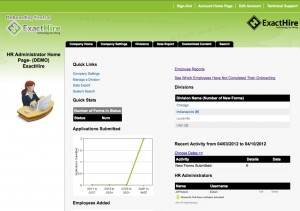
  • Onboarding Central Administrator ViewEnsure that data is collected and stored in a secure, web-based environment. With the proper administrative login credentials, information can then be accessed from any computer with an internet connection.
  • Continue to follow government guidelines regarding the completion of the Form I-9.
    • New hires will submit information that populates the employee section and then electronically sign the Form I-9.
    • Then, HR administrators will process new I-9’s electronically by reviewing and verifying employees’ acceptable documents to establish identity and employment authorization. Once this has been done, these employer representatives will electronically sign the form, as well.
  • Eliminate the frustration of receiving new employee paperwork that is missing important information. Use the employee onboarding software to require critical fields so that employees may not sign and submit their forms until all required fields are completed.
  • Change benefit vendors? No problem. Electronic forms for the new vendor(s) can easily be added and existing employee information may then populate the appropriate forms.
    • Then, employees may log back into the onboarding software to review, verify and sign any new or updated paperwork.

Here is a listing of just some of the employment forms that many organizations choose to incorporate into their web-based onboarding application:

  • Form I-9
  • Federal Form W-4
  • State tax forms
  • WOTC Form 8850
  • Direct deposit form
  • Emergency contact form
  • 401(k) enrollment form
  • Health insurance enrollment form
  • Long Term Disability insurance / Dental insurance enrollment form
  • Computer and Internet usage policy acknowledgement form
  • Confidentiality agreement form
  • Employee handbook acknowledgement form (with link to the employee handbook document)
  • Driver’s license check authorization form
  • New employee checklist form
  • Training schedule form
  • Continuous education program form
  • Payroll application user guide

So, are you ready to get rid of those dusty file cabinets in your office? For more information about ExactHire’s employee onboarding software, please contact us.